
VS Code - Git push Permission Denied
原创...大约 2 分钟
VS Code 是一款非常好的编辑器,但相信很多人会遇到这么一种情况,想使用 VS Code 中的 Git 快捷方式把最新的代码推送(push)到远程仓库
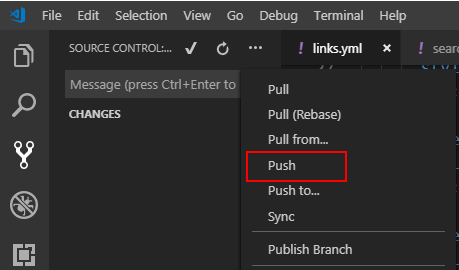
但是会遇到这样的错误提示 Permission Denied(publickey):

从控制台可以看到这样的 log
Permission denied (publickey).
fatal: Could not read from remote repository.
Please make sure you have the correct access rights
and the repository exists.
从提示中,我们知道原因是没有权限。
根本原因是我们在 Git 中设置了 passphrase,也就是,如果我们使用 Git 命令行方式提交时,会让我们输入密码,我们只有输入正确的 passphrase 才可以 push:

但是在 VS Code 中使用 Git 的话,不会有弹窗输入这个 passphrase!
因此解决的方法可以是
重新配置 Git 设置 passphrase 时不要设置,直接回车跳过。 但是这样,不大可能为了方便,专门去设置,而且这样可能失去了安全性。
统一 VS Code 和 Git 环境 2.1
win/cmd + r启动命令行 2.2 输入start-ssh-agent启动 ssh,并输入 passphrase 2.3 命令行中输入code启动 VS Code
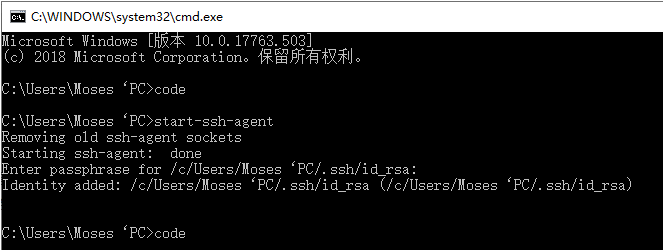
之后再到 VS Code 中 push,就不会有 Permission Denied(publickey) 的提示了。
如果遇到其他软件也有类似的问题,可以尝试使用以上两种方式解决,建议新手在设置 Git 时不要设置 passphrase,避免填不必要的坑。
Powered by Waline v3.0.0-alpha.10